Warning: file_put_contents(/var/www/thisisdown.com/public_html/logs/breadcrumb_debug.log): Failed to open stream: No such file or directory in /home/thisisdown.com/public_html/templates/breadcrumbs.php on line 185
Warning: file_put_contents(/var/www/thisisdown.com/public_html/logs/breadcrumb_debug.log): Failed to open stream: No such file or directory in /home/thisisdown.com/public_html/templates/breadcrumbs.php on line 192
Warning: file_put_contents(/var/www/thisisdown.com/public_html/logs/breadcrumb_debug.log): Failed to open stream: No such file or directory in /home/thisisdown.com/public_html/templates/breadcrumbs.php on line 198
Galaxy Wearable
"Is Galaxy Wearable working?"
Galaxy Wearable is working normally
All systems are operational. Galaxy Wearable is accessible and functioning properly.
Status Chart
This chart displays the hourly status data for over a 24-hour period
Now
24h ago
Operational
Partially working
Major outage
Not working
Recovering
Timeline
A chronological log of system events, performance fluctuations, and user reports. Each entry is tagged with time, status, affected regions, and resolution details for comprehensive tracking and analysis.
Service Status: All systems operational and responding normally
Performance Trend (24h): Service stability is degrading
Community Reports: No issues reported by users in the last 24 hours
Global Availability: Working normally worldwide
What issues are you experiencing?
Please choose the type of issue you're having with the Android app.
Reporting chart
This graph shows problem reports in the last 24 hours compared to typical patterns. The dashed line shows historical baseline when available.
Loading...
Vote statistics being updated...
No votes in the last 24 hours
Chart will appear when users start reporting
Recent reports
Every user report, from every country, visualized in real-time. Reports are displayed in descending chronological order (newest first) to ensure the most recent issues are immediately visible and no problem goes unnoticed.
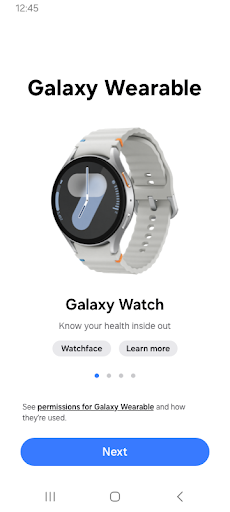
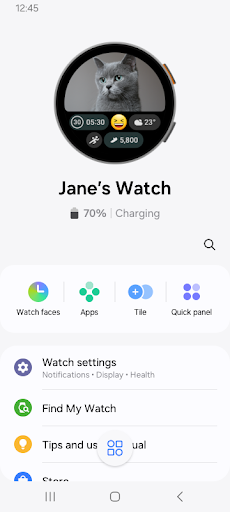
The Galaxy Wearable application connects your wearable devices to your mobile device. It also manages and monitors the wearable device features and applications you've installed through Galaxy Apps.
Use the Galaxy Wearable application to set up and manage the following features:
- Mobile device connection/disconnection
- Software updates
- Clock s...
The Galaxy Wearable application connects your wearable devices to your mobile device. It also manages and monitors the wearable device features and applications you've installed through Galaxy Apps.
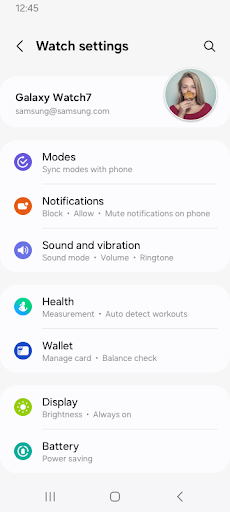
Use the Galaxy Wearable application to set up and manage the following features:
- Mobile device connection/disconnection
- Software updates
- Clock settings
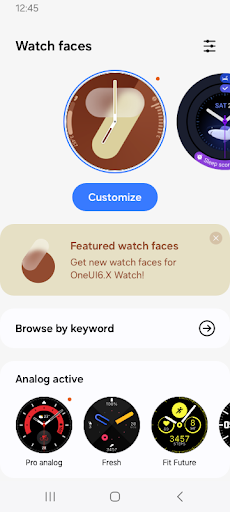
- Application download and settings
- Find my Watch
- Notification type and settings, etc.
Install the Galaxy Wearable application on your mobile device, then pair your wearable devices via Bluetooth to enjoy all of its features.
※ Settings and features provided by the Galaxy Wearable application are only available when your wearable device is connected to your mobile device. Features will not work properly without a stable connection between your wearable device and your mobile device.
※ The Galaxy Wearable application does not support the Gear VR or Gear 360.
※ only for Galaxy Buds models, The Galaxy Wearable application can be used with tablets .
※ Supported devices vary depending on your region, operator, and device model.
※ Please allow the Galaxy Wearable application permissions in Android Settings so you can use all the functions in Android 6.0.
Settings > Apps > Galaxy Wearable > Permissions
※ Access permission information
The following access permissions are required to provide you with this service.
Basic features of the service can be used even if optional access permissions are not granted.
Depending on the wearable device you are connecting, the required access permissions may vary.
[Required access permissions]
- Location: To search for nearby connectable devices to connect to the Gear via Bluetooth (Android 11 or lower)
- Nearby devices: To search for nearby connectable devices to connect to the Gear via Bluetooth (Android 12 or higher)
[Optional access permissions]
* Optional permissions may be required depending on the wearable device you are connecting.
- Phone: To verify the unique identification information of devices for app updates and for installing plug-in apps
- Address book: To provide services that require account syncing by using the registered Samsung account information
- Calendar: To provide schedule syncing with the wearable device
- Call logs: To provide call log syncing with the wearable device
- SMS: To provide SMS syncing with the wearable device
App Screenshots
User Reviews from Store
Showing 8 of 10 reviews
(Page 1 of 2)
B
Ben Snyder
Oct 9, 2025
This app rarely works properly. so many bugs because Samsung is cheaping out with a universal app. currently cannot download watch faces because there is a "network error" despite being connected to the Internet
S
Sakthi ganesan Pillai
Oct 9, 2025
WhatsApp messages in the galaxy watch will not auto remove the count in watch once read. please rectify this
R
Rafael R.
Oct 9, 2025
This new update is terrible, it just took away any options for me to actively view my galaxy buds and case battery percentage, I no longer have any sound adjustment settings. I can only unpair, rename or disconnect my buds. there are no other options or information.
V
Viktor Dimitrov
Oct 9, 2025
With every update this app becomes worse! Since the new update they removed headphones controls from the app. Rock bottom is near.
J
JEANNE BROWN
Oct 9, 2025
so easy to use. So easy to use.
G
Gulam Yasin Attari
Oct 9, 2025
Best
G
Greg Wood
Oct 9, 2025
I've got a 1st generation galaxy watch. had it for years. the app only seems to offer me Samsung faces now. has something changed? I used to be able to buy cool faces and stuff. what's the deal?
Z
Zero x
Oct 9, 2025
how bad can your software be, I use a SAMSUNG phone with a SAMSUNG watch and for NO reason it disconnects the watch AND requires me to RESET said watch to pair it again. You absolute planned obsolescence heads of unjoy. The watch uses the SAME SaMsUnG Account, the same Google Account, it was literally paired for TWO YEARS why wouldn't you implement a PAIRING dialogue and let me enter some pin or idk. Oh it just HAPPENS to be an "old" galaxy watch 5 right? Eat soup from my unshaven elbows.
Comments & Discussion
0 Comments
Be the first to comment on Galaxy Wearable status
Share your experience with the community