Warning: file_put_contents(/var/www/thisisdown.com/public_html/logs/breadcrumb_debug.log): Failed to open stream: No such file or directory in /home/thisisdown.com/public_html/templates/breadcrumbs.php on line 185
Warning: file_put_contents(/var/www/thisisdown.com/public_html/logs/breadcrumb_debug.log): Failed to open stream: No such file or directory in /home/thisisdown.com/public_html/templates/breadcrumbs.php on line 192
Warning: file_put_contents(/var/www/thisisdown.com/public_html/logs/breadcrumb_debug.log): Failed to open stream: No such file or directory in /home/thisisdown.com/public_html/templates/breadcrumbs.php on line 198
Mobile Passport Control
"Is Mobile Passport Control working?"
Mobile Passport Control is working normally
All systems are operational. Mobile Passport Control is accessible and functioning properly.
Status Chart
This chart displays the hourly status data for over a 24-hour period
Now
24h ago
Operational
Partially working
Major outage
Not working
Recovering
Timeline
A chronological log of system events, performance fluctuations, and user reports. Each entry is tagged with time, status, affected regions, and resolution details for comprehensive tracking and analysis.
Service Status: All systems operational and responding normally
Performance Trend (24h): Service stability is degrading
Community Reports: No issues reported by users in the last 24 hours
Global Availability: Working normally worldwide
What issues are you experiencing?
Please choose the type of issue you're having with the Android app.
Reporting chart
This graph shows problem reports in the last 24 hours compared to typical patterns. The dashed line shows historical baseline when available.
Loading...
Vote statistics being updated...
No votes in the last 24 hours
Chart will appear when users start reporting
Recent reports
Every user report, from every country, visualized in real-time. Reports are displayed in descending chronological order (newest first) to ensure the most recent issues are immediately visible and no problem goes unnoticed.
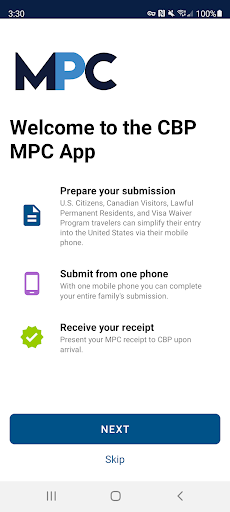
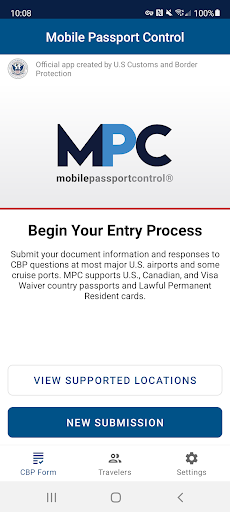
Mobile Passport Control (MPC) is an official application created by U.S. Customs and Border Protection that streamlines your CBP inspection process at select U.S. entry locations. Simply complete your travel information, answer CBP inspection questions, capture a photo of yourself and of each member of your group, and follow the instructions provid...
Mobile Passport Control (MPC) is an official application created by U.S. Customs and Border Protection that streamlines your CBP inspection process at select U.S. entry locations. Simply complete your travel information, answer CBP inspection questions, capture a photo of yourself and of each member of your group, and follow the instructions provided on your receipt.
Important Notes:
- MPC does not replace your passport; your passport will still be required for travel.
- MPC is only available at supported CBP entry locations.
- MPC is a voluntary program which can be used by U.S. Citizens, certain Canadian Citizen Visitors, Lawful Permanent Residents, and returning Visa Waiver Program applicants with an approved ESTA.
More information regarding eligibility and supported CBP entry locations can be found on our website: https://www.cbp.gov/travel/us-citizens/mobile-passport-control
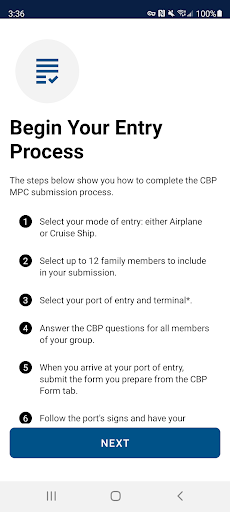
MPC can be used in 6 simple steps:
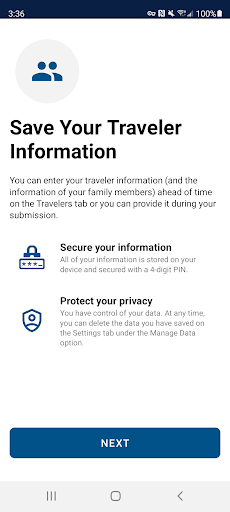
1. Create a primary profile to save your travel documents and biographic information. You can add and save additional eligible people to the MPC app so that you can submit together from one device. Your information will be securely stored on your device to be used for future travel.
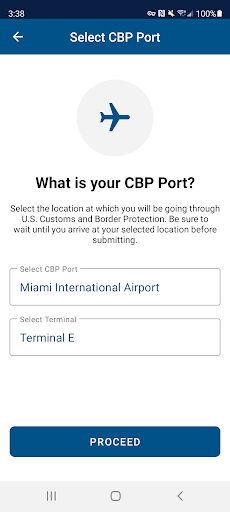
2. Select your CBP port of entry, terminal (if applicable), and add up to 11 additional members of your group to include in your submission.
3. Answer CBP inspection questions and certify the truthfulness and accuracy of your answers.
4. Upon arriving at your selected port of entry, tap the “Yes, Submit Now” button. You will be asked to capture a clear and unobstructed photo of yourself and of each other person that you included in your submission.
5. Once your submission is processed, CBP will send a virtual receipt back to your device. Follow the instructions on your receipt and be prepared to present your passport and other relevant travel documents.
6. The CBP Officer will complete the inspection. If further information is required, the CBP Officer will let you know. Please note: The CBP Officer may ask to capture an additional photo of you or your group members for verification.
App Screenshots
User Reviews from Store
Showing 8 of 30 reviews
(Page 2 of 4)
B
Boo Life
Nov 2, 2025
ez to use app
S
Sally Mahoney
Nov 2, 2025
Installed in line instead airport it did what it needed to do
H
Ha Thai
Oct 31, 2025
fast and convenient
J
Julie Parry
Oct 30, 2025
wasn't working properly
V
Victoria Fuentes
Oct 30, 2025
great service!
U
Uli Ballhausen
Oct 30, 2025
very helpful
B
Barry WALDRON
Oct 30, 2025
Pretty good operational software it's amazing the day and age we live in.

J
John Hirst
Oct 30, 2025
Great app 😁
Comments & Discussion
0 Comments
Be the first to comment on Mobile Passport Control status
Comments & Discussion
0 Comments
Be the first to comment on Mobile Passport Control status
Share your experience with the community