Warning: file_put_contents(/var/www/thisisdown.com/public_html/logs/breadcrumb_debug.log): Failed to open stream: No such file or directory in /home/thisisdown.com/public_html/templates/breadcrumbs.php on line 185
Warning: file_put_contents(/var/www/thisisdown.com/public_html/logs/breadcrumb_debug.log): Failed to open stream: No such file or directory in /home/thisisdown.com/public_html/templates/breadcrumbs.php on line 192
Warning: file_put_contents(/var/www/thisisdown.com/public_html/logs/breadcrumb_debug.log): Failed to open stream: No such file or directory in /home/thisisdown.com/public_html/templates/breadcrumbs.php on line 198
Cisco Secure Client-AnyConnect
"Is Cisco Secure Client-AnyConnect working?"
Cisco Secure Client-AnyConnect is working normally
All systems are operational. Cisco Secure Client-AnyConnect is accessible and functioning properly.
Status Chart
This chart displays the hourly status data for over a 24-hour period
Now
24h ago
Operational
Partially working
Major outage
Not working
Recovering
Timeline
A chronological log of system events, performance fluctuations, and user reports. Each entry is tagged with time, status, affected regions, and resolution details for comprehensive tracking and analysis.
Service Status: All systems operational and responding normally
Performance Trend (24h): Service stability is degrading
Community Reports: No issues reported by users in the last 24 hours
Global Availability: Working normally worldwide
What issues are you experiencing?
Please choose the type of issue you're having with the Android app.
Reporting chart
This graph shows problem reports in the last 24 hours compared to typical patterns. The dashed line shows historical baseline when available.
Loading...
Vote statistics being updated...
No votes in the last 24 hours
Chart will appear when users start reporting
Recent reports
Every user report, from every country, visualized in real-time. Reports are displayed in descending chronological order (newest first) to ensure the most recent issues are immediately visible and no problem goes unnoticed.
KNOWN ISSUES:
- Some freezes are known to occur on the Diagnostics screen
- Split DNS is not available on Android 7.x/8.x (OS limitation)
LIMITATIONS:
The following features are not supported using this package:
- Filter Support
- Trusted Network Detection
- Split Exclude
- Local LAN Exception...
Formerly AnyConnect
COMPATIBLE DEVICES:
Android 4.4+
KNOWN ISSUES:
- Some freezes are known to occur on the Diagnostics screen
- Split DNS is not available on Android 7.x/8.x (OS limitation)
LIMITATIONS:
The following features are not supported using this package:
- Filter Support
- Trusted Network Detection
- Split Exclude
- Local LAN Exception
- Secure Gateway Web Portal (inaccessible when tunneled)
APPLICATION DESCRIPTION:
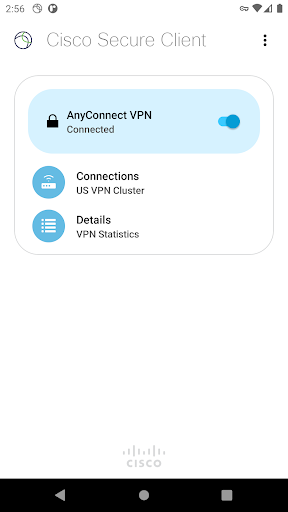
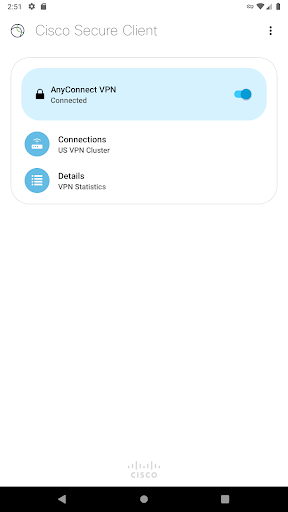
Cisco Secure Client provides reliable and easy-to-deploy encrypted network connectivity from devices by delivering persistent corporate access for users on the go. Whether providing access to business email, a virtual desktop session, or most other Android applications, Cisco Secure Client enables business-critical application connectivity.
The Cisco Umbrella module for Cisco Secure Client on Android provides DNS-layer protection for Android v6.0.1 and later and can be enabled with or without a Cisco Secure Client license
LICENSING AND INFRASTRUCTURE REQUIREMENTS:
This software is licensed for exclusive use by Cisco headend customers with active Plus, Apex or VPN Only licenses (term or perpetual with active SASU contracts). Use is no longer permitted with Essentials/Premium with Mobile license. Cisco Secure Client use with non-Cisco equipment/software is prohibited.
http://www.cisco.com/c/dam/en/us/products/security/anyconnect-og.pdf
Trial Cisco Secure Client Apex (ASA) licenses are available for administrators at www.cisco.com/go/license
Cisco Secure Client for Android requires Cisco Adaptive Security Appliance (ASA) Boot image 8.0(4) or later. For licensing questions and evaluation licenses, please contact ac-temp-license-request (AT) cisco.com and include a copy of "show version" from your Cisco ASA.Β
Umbrella licenses are required for the Umbrella module on Cisco Secure Client. Click the link below for more information on Umbrella licensing:
https://learn-umbrella.cisco.com/datasheets/cisco-umbrella-package-comparison-2
FEATURES:
- Automatically adapts its VPN tunneling to the most efficient method based on network constraints, using TLS and DTLS
- DTLS provides an optimized network connection
- IPsec/IKEv2 also available
- Network roaming capability allows connectivity to resume seamlessly after IP address change, loss of connectivity, or device standby
- Wide range of authentication options
- Supports certificate deployment using Cisco Secure Client integrated SCEP and the certificate import URI handler
- Policies can be configured locally, and automatically updated from the security gateway
- Access to internal IPv4/IPv6 network resources
- Administratively controlled tunnel policy
- Localizes according to the device's language and region settings
- DNS security with Umbrella module
SUPPORT:
If you are an end-user and have any issues or concerns, please contact your organizationβs support department. If you are a System Administrator having difficulties configuring or utilizing the Application, please contact your designated support point of contact.
FEEDBACK:
You can provide us with feedback by sending us a log bundle by navigating to "Menu > Diagnostics > Send Logs" and choose "Feedback to Cisco" with a description of the issue. Please read the Known Issues section prior to sending feedback.
Comments & Discussion
0 Comments
Be the first to comment on Cisco Secure Client-AnyConnect status
Share your experience with the community