Warning: file_put_contents(/var/www/thisisdown.com/public_html/logs/breadcrumb_debug.log): Failed to open stream: No such file or directory in /home/thisisdown.com/public_html/templates/breadcrumbs.php on line 185
Warning: file_put_contents(/var/www/thisisdown.com/public_html/logs/breadcrumb_debug.log): Failed to open stream: No such file or directory in /home/thisisdown.com/public_html/templates/breadcrumbs.php on line 192
Warning: file_put_contents(/var/www/thisisdown.com/public_html/logs/breadcrumb_debug.log): Failed to open stream: No such file or directory in /home/thisisdown.com/public_html/templates/breadcrumbs.php on line 198
MyHyundai with Bluelink
"Is MyHyundai with Bluelink working?"
MyHyundai with Bluelink is working normally
All systems are operational. MyHyundai with Bluelink is accessible and functioning properly.
Status Chart
This chart displays the hourly status data for over a 24-hour period
Now
24h ago
Operational
Partially working
Major outage
Not working
Recovering
Timeline
A chronological log of system events, performance fluctuations, and user reports. Each entry is tagged with time, status, affected regions, and resolution details for comprehensive tracking and analysis.
Service Status: All systems operational and responding normally
Performance Trend (24h): Service stability is degrading
Community Reports: No issues reported by users in the last 24 hours
Global Availability: Working normally worldwide
What issues are you experiencing?
Please choose the type of issue you're having with the Android app.
Reporting chart
This graph shows problem reports in the last 24 hours compared to typical patterns. The dashed line shows historical baseline when available.
Loading...
Vote statistics being updated...
No votes in the last 24 hours
Chart will appear when users start reporting
Recent reports
Every user report, from every country, visualized in real-time. Reports are displayed in descending chronological order (newest first) to ensure the most recent issues are immediately visible and no problem goes unnoticed.
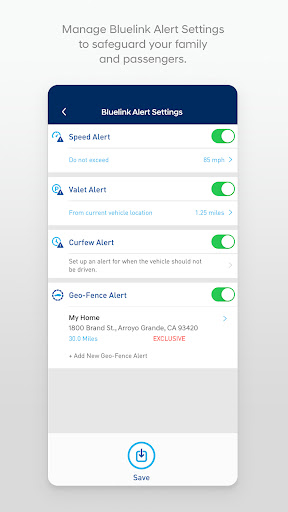
The MyHyundai app makes getting information about your Hyundai vehicle easier than ever. The MyHyundai app allows you to access owner resources, schedule service or connect to your Bluelink enabled vehicle from your phone. Bluelink technology enables and empowers you while you are on the go, giving you access to your Bluelink features from your off...
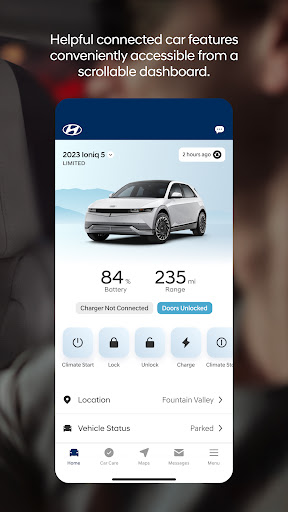
The MyHyundai app makes getting information about your Hyundai vehicle easier than ever. The MyHyundai app allows you to access owner resources, schedule service or connect to your Bluelink enabled vehicle from your phone. Bluelink technology enables and empowers you while you are on the go, giving you access to your Bluelink features from your office, at home, or just about anywhere.
Access the app with your MyHyundai.com ID, password and PIN to take advantage of Bluelinkβs Remote features. Log in and send commands conveniently using biometric authentication (fingerprint or face recognition). An active Bluelink subscription is required to use Bluelink features in the app. To renew or upgrade to either Remote or Guidance, please visit MyHyundai.com.
An active Bluelink Remote Package (R) or Guidance Package (G) subscription is required to access select features. Feature support varies by vehicle model. Please visit HyundaiBluelink.com to check what Bluelink features your vehicle supports.
With the MyHyundai app you can:
β’ Remotely start your vehicle (R)
β’ Remotely unlock or lock the door (R)
β’ Start your vehicle with saved presets you customize (R)
β’ View charging status, manage charging schedules and settings (EV and PHEV vehicles only) (R)
β’ Learn more about key features with user tutorials
β’ Remotely activate the horn and lights (R)
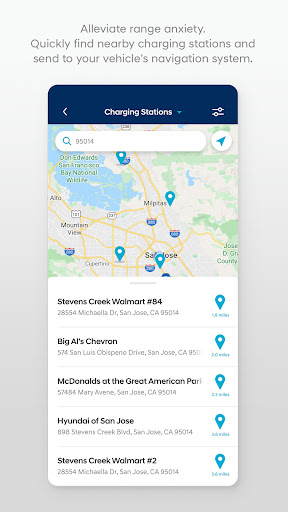
β’ Search and send Points of Interest to your vehicle (G)
β’ Access saved POI History (G)
β’ Make a Car Care service appointment
β’ Access Bluelink Customer Care
β’ Find your car (R)
β’ Access maintenance information and other convenient features.
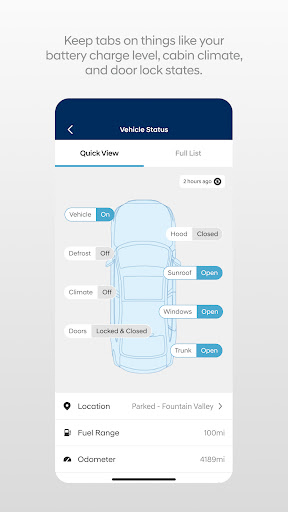
β’ Check Vehicle Status (supported on select 2015MY+ vehicles)
β’ Access vehicle features with four phone widgets for Remote Features, Parking Meter, POI search and Ioniq EV vehicle
MyHyundai app also supports Wear OS smartwatch features. Use voice commands or the smartwatch menu to access select features.
With MyHyundai for Wear OS you can:
β’ Remotely start your vehicle (R)
β’ Remotely unlock or lock the door (R)
β’ Remotely activate the horn and lights (R)
β’ Find your car (R)
*Note: Active Bluelink subscription and Bluelink equipped vehicle with capabilities required.
The MyHyundai app asks for the following device permissions as needed:
β’ Camera: For adding driver and profile pictures
β’ Contacts: To select from phone contacts when sending secondary driver invites
β’ Location: For map and location functionality throughout the app
β’ Phone: For placing calls when tapping on buttons or links to call
β’ Files: For saving PDFs or other downloaded documents to the device
β’ Notifications: To allow push notification messages from the app
β’ Biometrics: For enabling fingerprint and/or face recognition for authentication
For technical assistance, please contact us at AppsTeam@hmausa.com.
Disclaimer: Feature support varies by vehicle model. Please visit HyundaiBluelink.com to check what Bluelink features your vehicle supports.
App Screenshots
User Reviews from Store
Showing 8 of 10 reviews
(Page 1 of 2)
N
natan
Oct 11, 2025
Great service. reliable
J
Jenny Shook
Oct 11, 2025
Convenient when hubby drives and forgets to lock the doors
M
Michael McEacharn
Oct 10, 2025
this app sucks. toyato app is way better. whoever made this app needs to be fired.
L
Lori
Oct 10, 2025
This app is buggy.My biggest issue is I never get vehicle health reports anymore. Customer support keeps telling me to turn on the notification setting and I keep telling them it IS on. I also keep getting emails that my car, which is unlocked and in my garage, is unlocked, even tho I don't have that notification turned on, which is annoying. Customer support doesn't appear interested in fixing anything.
N
Nad Sha
Oct 10, 2025
two times I left my window open overnight, I did not get a single notification for leaving my window open. Before, I used to get notification for open window when my window was closed now is exactly opposite. My previous car was 2024 Kia Forte Gt-line and App were perfect. but my 2025 Hyundai Elantra Limited App is very glitchy. hopefully there is going to be an update soon.
D
daretta preston
Oct 9, 2025
I love this app
J
Jakub Piechnik
Oct 9, 2025
This app cannot be trusted to actually charge your car according to the schedule you set. if you absolutely need a charge done by the morning you have to do it manually or else risk having an uncharged car. not worth the money
S
Shawn Butler
Oct 9, 2025
great app easy to use and lots of extras
Comments & Discussion
0 Comments
Be the first to comment on MyHyundai with Bluelink status
Comments & Discussion
0 Comments
Be the first to comment on MyHyundai with Bluelink status
Share your experience with the community