Warning: file_put_contents(/var/www/thisisdown.com/public_html/logs/breadcrumb_debug.log): Failed to open stream: No such file or directory in /home/thisisdown.com/public_html/templates/breadcrumbs.php on line 185
Warning: file_put_contents(/var/www/thisisdown.com/public_html/logs/breadcrumb_debug.log): Failed to open stream: No such file or directory in /home/thisisdown.com/public_html/templates/breadcrumbs.php on line 192
Warning: file_put_contents(/var/www/thisisdown.com/public_html/logs/breadcrumb_debug.log): Failed to open stream: No such file or directory in /home/thisisdown.com/public_html/templates/breadcrumbs.php on line 198
SharkClean
"Is SharkClean working?"
SharkClean is working normally
All systems are operational. SharkClean is accessible and functioning properly.
Status Chart
This chart displays the hourly status data for over a 24-hour period
Now
24h ago
Operational
Partially working
Major outage
Not working
Recovering
Timeline
A chronological log of system events, performance fluctuations, and user reports. Each entry is tagged with time, status, affected regions, and resolution details for comprehensive tracking and analysis.
Service Status: All systems operational and responding normally
Performance Trend (24h): Service stability is degrading
Community Reports: No issues reported by users in the last 24 hours
Global Availability: Working normally worldwide
What issues are you experiencing?
Please choose the type of issue you're having with the Android app.
Reporting chart
This graph shows problem reports in the last 24 hours compared to typical patterns. The dashed line shows historical baseline when available.
Loading...
Vote statistics being updated...
No votes in the last 24 hours
Chart will appear when users start reporting
Recent reports
Every user report, from every country, visualized in real-time. Reports are displayed in descending chronological order (newest first) to ensure the most recent issues are immediately visible and no problem goes unnoticed.
Unlock powerful cleaning performance and clean your home from anywhere in the world with the SharkClean app!
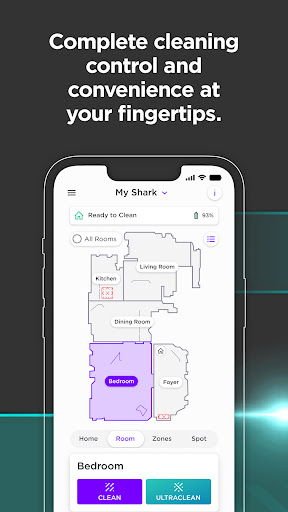
The SharkClean app is the hub for customizing your robot’s settings.
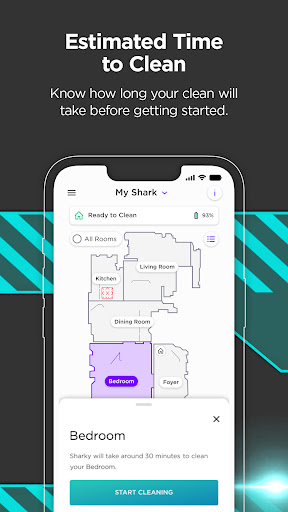
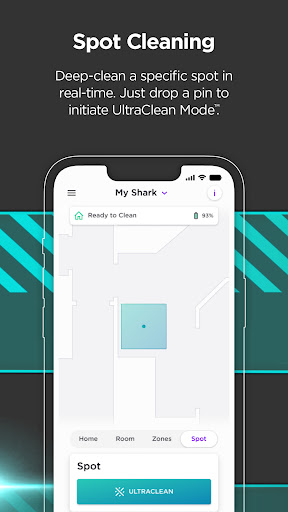
Get the most from your Shark by scheduling cleans, creating a map of your home that you can customize and edit, clean by specific rooms or areas immediately*, and mor...
Unlock powerful cleaning performance and clean your home from anywhere in the world with the SharkClean app!
The SharkClean app is the hub for customizing your robot’s settings.
Get the most from your Shark by scheduling cleans, creating a map of your home that you can customize and edit, clean by specific rooms or areas immediately*, and more — all in the app.
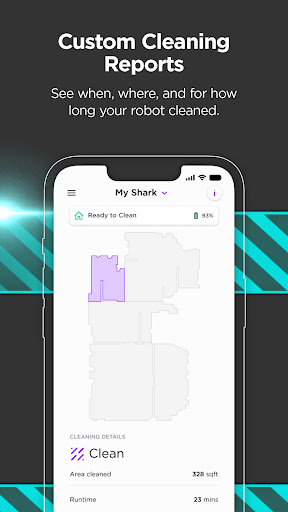
Plus, quickly access troubleshooting tips and FAQs, get notifications, and see detailed Cleaning Reports* with the SharkClean app.
*varies by model.
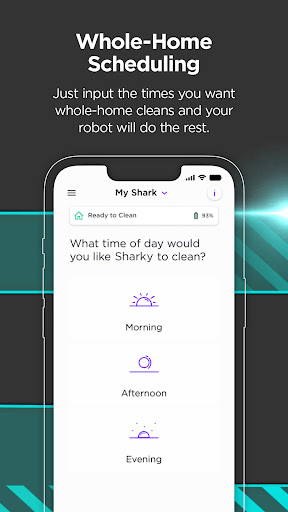
1. SCHEDULE CLEANINGS (All Models)
● Schedule your Shark to run when it’s convenient for you.
● Easily adjust the days and times your robot cleans your home.
2. VOICE CONTROLS WITH AMAZON ALEXA & GOOGLE HOME (All models)
● Use voice commands to control your Shark.
● Compatible with Google Assistant** and Alexa*** enabled devices.
3. ENABLE RECHARGE & RESUME (1000 & 2000 models)
● Get even better cleaning coverage with Recharge & Resume.
● With recharge and resume, your robot returns to the base, recharges, and can pick up where it left off.
4. CLEAN SPECIFIC ROOMS OR ZONES (1000 & 2000 models)
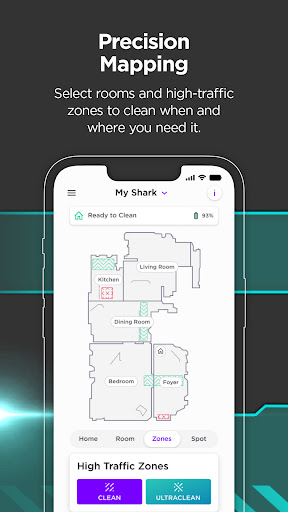
● Once your robot generates a map of your home, you can create rooms and high-traffic zones.
● Customize cleaning by immediately sending your robot to clean specific rooms and zones from the SharkClean app.
5. SWITCH TO VACMOP™ MODE (RV2000WD model)
● Vacuum and mop your floors at the same time with VacMop ™ mode.
● Your robot skillfully avoids carpets while scrubbing your floor 100 times per minute.
Requirements:
● Shark® Connected Robotic Vacuum (Models Supported: 700, 800, 900, 1000, and 2000)
● Wi-Fi with 2.4GHz band support
For U.S. support, visit sharkclean.com for additional information or to contact support.
For E.U. support, visit sharkclean.eu for additional information or to contact support.
**Google is a trademark of Google LLC
***Amazon, Alexa, and all related logos are trademarks of Amazon.com or its affiliates.
App Screenshots
User Reviews from Store
Showing 4 of 20 reviews
(Page 3 of 3)
F
Faith tipsword
Oct 16, 2025
love having the app right at my fingertips!! so convenient!
L
Logan Oliver
Oct 16, 2025
Upgraded to a new mop and vacuum unit. App seemed better but still absolutely terrible. Incredibly slow and buggy. Also, the new vacuum/mop unit is worse than previous vacuum only model. On a good day this app is three stars...
Y
Yen Nihn
Oct 16, 2025
It's not easy to paired, the Bluetooth.
E
Erin Smurthwaite
Oct 16, 2025
it's odd that the app was changed to no longer be able to adjust water flow. it seems since the update I can't get my unit to properly mop. it doesn't spray enough water anymore. I have tried the available trouble shooting options. but nothing helps. seems to be a software issue upon the update.
Comments & Discussion
0 Comments
Be the first to comment on SharkClean status
Share your experience with the community